For ideal signal transmission, the antenna should be placed in a vertical position. If the antenna is not in a vertical position, the LED blinks fast.
It is not recommended to do this, but if you want to mount it horizontally or in a tilted position, you can disable this tilt indicator.
Step 1
Open the Z-Wave integration page
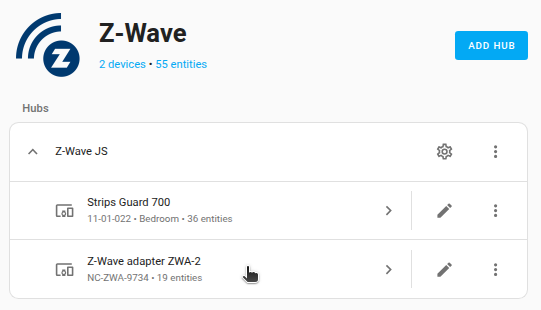
- Go to Settings > Devices & services and select the Z-Wave integration card.
- From the list, next to Home Assistant Connect ZWA-2, select the arrow button..
Step 2
Enable the tilt indicator entity
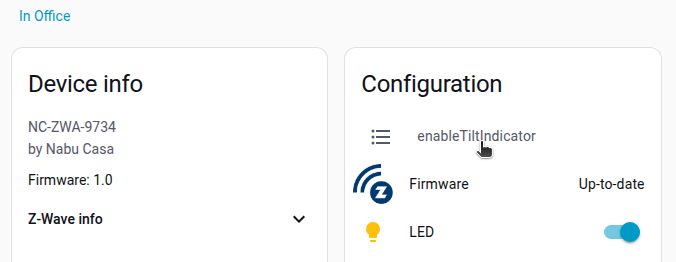
- Under Configuration, select enableTiltIndicator.
- In the dialog, select the cogwheel and Enable the entity.
- It takes a while for the entity to become active.
Step 3
Disable the tilt indicator
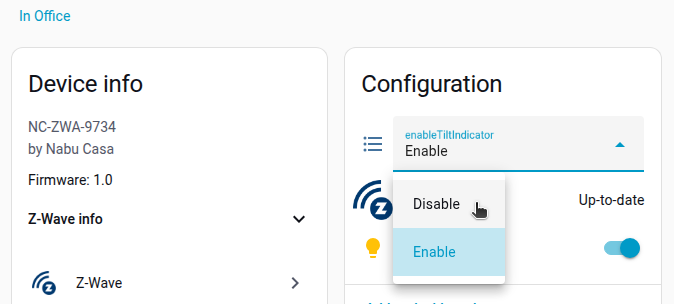
Once the entity is enabled, you can now disable the tilt indicator.
Result: The LED no longer blinks fast when the device is tilted.