Instructions on installing a Raspberry Pi Z-Wave module on Home Assistant Yellow. This procedure can help you get started if you already have one of the 700 series hats listed below.
Tip:
If you are just starting out with Z-Wave, it is recommended to use an 800 series adapter, such as Home Assistant Connect ZWA-2.
- In general, it is recommended to use a USB adapter. For more information, refer to the documentation on supported Z-Wave controllers in Home Assistant.
This procedure has been tested with the following modules:
- Aeotec Z-Pi 7 Raspberry Pi HAT/Shield
- Z-Wave.Me RaZberry 7
- Z-Wave.Me RaZberry 7 Pro
To install a Raspberry Pi Z-Wave module on Home Assistant Yellow
-
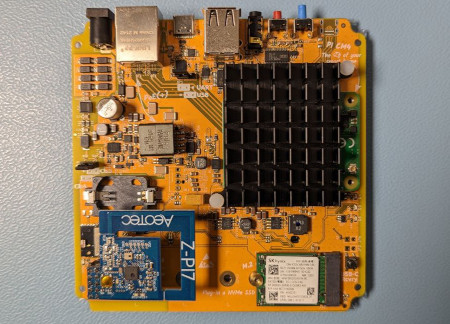
Make sure the module is properly seated on the Home Assistant Yellow.
-
Carefully close the case (see Reassembling your Home Assistant Yellow section) and power up Home Assistant Yellow.
-
Follow the procedure on setting up a Z-Wave JS server.
- In step 2, follow the manual setup steps to install the Z-Wave integration.
- When prompted to choose a Device path, choose
ttyAMA0.